

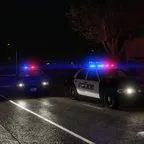
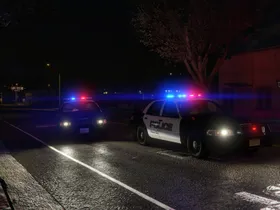
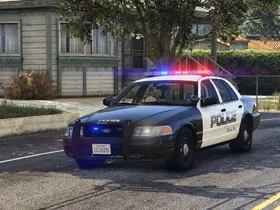
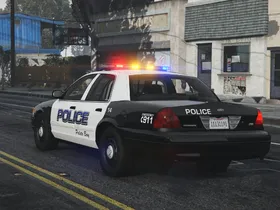
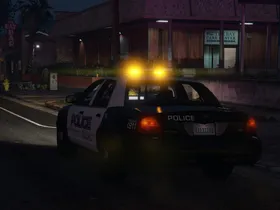
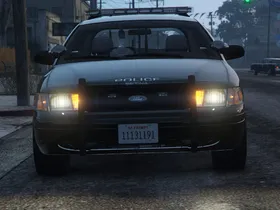
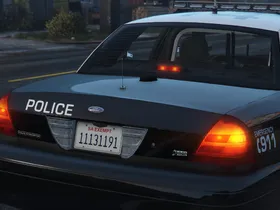
Recommended to decrease brightness for other cars cars such as taxis: Vanilla Vehicles Emissives Fix
Note that the brightness looks different depending on the game's resolution. To change the brightness, edit the defaultlight and sirenlight values, it is recommended to increase or decrease these values in increments of around 10-20% before testing when making adjustments.
The included visualsettings.dat is optimized for the default vanilla graphics. When used with different graphics mods, results may differ.
Settings for VisualV
Settings optimized for VisualV, requires manual file editing:
Open VisualV's visualsettings.dat (GTA V/update/update.rpf/common/data/visualsettings.dat) in a text editor and replace the following lines. Replace the original visualsettings.dat with the modified one.
# emissive bits
car.headlight.day.emissive.on	20.00
car.headlight.night.emissive.on	20.00
car.headlight.day.emissive.off	0.001
car.headlight.night.emissive.off	0.001
car.taillight.day.emissive.on	30.0
car.taillight.night.emissive.on	30.0
car.taillight.day.emissive.off	0.001
car.taillight.night.emissive.off	0.001
car.indicator.day.emissive.on	500.00
car.indicator.night.emissive.on	400.00
car.indicator.day.emissive.off	0.001
car.indicator.night.emissive.off	0.001
car.reversinglight.day.emissive.on	20.00
car.reversinglight.night.emissive.on	20.00
car.reversinglight.day.emissive.off	0.001
car.reversinglight.night.emissive.off	0.001
car.defaultlight.day.emissive.on	1400.00
car.defaultlight.night.emissive.on	700.00
car.defaultlight.day.emissive.off	0.001
car.defaultlight.night.emissive.off	0.001
car.brakelight.day.emissive.on	100.00
car.brakelight.night.emissive.on	100.00
car.brakelight.day.emissive.off	0.001
car.brakelight.night.emissive.off	0.001
car.middlebrakelight.day.emissive.on	50.00
car.middlebrakelight.night.emissive.on	50.00
car.middlebrakelight.day.emissive.off	0.001
car.middlebrakelight.night.emissive.off	0.001
car.extralight.day.emissive.on	9.00
car.extralight.night.emissive.on	9.00
car.extralight.day.emissive.off	0.001
car.extralight.night.emissive.off	0.001
car.sirenlight.day.emissive.on		1400.00
car.sirenlight.night.emissive.on	700.00
car.sirenlight.day.emissive.off		0.001
car.sirenlight.night.emissive.off	0.001
car.emissiveMultiplier 2.00// Bloom
bloom.threshold.min 0.4
bloom.threshold.expsoure.diff.min 0.0
bloom.threshold.expsoure.diff.max 0.0
bloom.threshold.power 1.0
bloom.blurblendmult.large 1.0
bloom.blurblendmult.med 1.5
bloom.blurblendmult.small 0.8Settings for VisualVanilla
Settings optimized for VisualVanilla, requires manual file editing:
Open VisualVanilla's visualsettings.dat (GTA V/update/update.rpf/common/data/visualsettings.dat) in a text editor and replace the following lines. Replace the original visualsettings.dat with the modified one.
# emissive bits
car.headlight.day.emissive.on    20.00
car.headlight.night.emissive.on    20.00
car.headlight.day.emissive.off    0.001
car.headlight.night.emissive.off    0.001
car.taillight.day.emissive.on    30.0
car.taillight.night.emissive.on    30.0
car.taillight.day.emissive.off    0.001
car.taillight.night.emissive.off    0.001
car.indicator.day.emissive.on    500.00
car.indicator.night.emissive.on    600.00
car.indicator.day.emissive.off    0.001
car.indicator.night.emissive.off    0.001
car.reversinglight.day.emissive.on    20.00
car.reversinglight.night.emissive.on    20.00
car.reversinglight.day.emissive.off 0.001
car.reversinglight.night.emissive.off    0.001
car.defaultlight.day.emissive.on    1200.0
car.defaultlight.night.emissive.on    800.0
car.defaultlight.day.emissive.off    0.001
car.defaultlight.night.emissive.off    0.001
car.brakelight.day.emissive.on    100.00
car.brakelight.night.emissive.on    100.00
car.brakelight.day.emissive.off    0.001
car.brakelight.night.emissive.off    0.001
car.middlebrakelight.day.emissive.on    50.00
car.middlebrakelight.night.emissive.on    50.00
car.middlebrakelight.day.emissive.off    0.001
car.middlebrakelight.night.emissive.off    0.001
car.extralight.day.emissive.on    9.00
car.extralight.night.emissive.on    9.00
car.extralight.day.emissive.off    0.001
car.extralight.night.emissive.off    0.001
car.sirenlight.day.emissive.on        1200.0
car.sirenlight.night.emissive.on    800.0
car.sirenlight.day.emissive.off        0.001
car.sirenlight.night.emissive.off    0.001
car.emissiveMultiplier 2.00// Bloom
bloom.threshold.min 0.4
bloom.threshold.expsoure.diff.min 0.0
bloom.threshold.expsoure.diff.max 0.0
bloom.threshold.power 1.0
bloom.blurblendmult.large 1.0
bloom.blurblendmult.med 1.5
bloom.blurblendmult.small 0.8Images
Copy the folder with its contents into your GTAV\lml folder.
Manual Installation
Use OpenIV to replace GTAV\update\update.rpf\common\data\visualsettings.dat with Files\visualsettings.dat.
-
Version 1.4
-
Cj24 -
May 16, 2026 at 8:49 AM -
3.82 MB -
882 Downloads
Adjusted siren emissive shader settings to match default lights to support vehicles using that shader.
-
-
Version 1.3
-
Cj24 -
June 20, 2022 at 10:04 AM -
3.51 MB -
4372 Downloads
-