1. Home
  2. Forums
  3. Downloads
    1. Featured Files
  4. Gallery
    1. Albums
  5. Guides
    1. SirenSetting Calculator
  6. Discord
  7. Accurate Studio
  • Login
  • Register
  • Search
EMS / Fire Dept.
  • Everywhere
  • EMS / Fire Dept.
  • Forum
  • Gallery
  • Files
  • Guides
  • More Options
  1. Modding Forum
  2. Downloads
  3. All Files
  4. Grand Theft Auto V
  5. Vehicles
  6. EMS / Fire Dept.

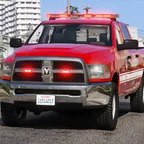
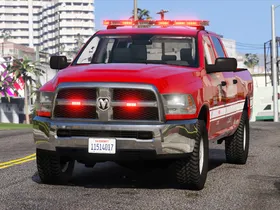
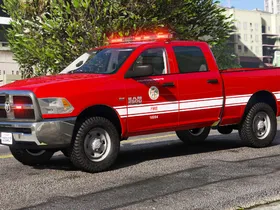
a 2016 Ram 2500 - Los Santos Fire Department - Pickup Truck

    • United States
    • Ram Trucks
    • ELS
    • Accurate Studio
  • Cj24
  • September 26, 2019 at 8:11 AM
  • 3.6k Downloads
  • 8 Comments
  • Download
  • Overview
  • Versions 1
  • Comments 8

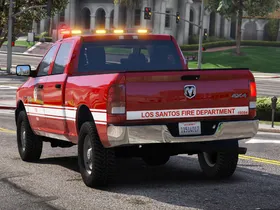
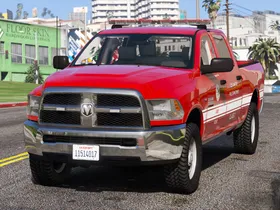
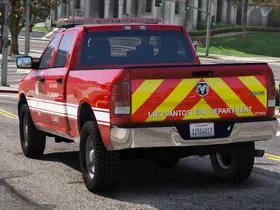
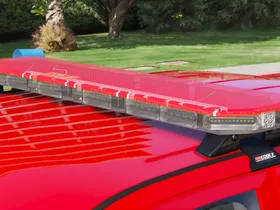
An LSFD 2016 Ram 2500 pickup truck with a Code 3 RX2700 lightbar, inspired by Ram trucks used by the Los Angeles Fire Department.

non-ELS/DLS Version:

File

2016 Ram 2500 - Pickup Truck - Los Santos Fire Department (LSFD/LAFD)
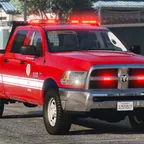
A 2016 LSFD Ram pickup truck with a Code 3 RX2700, inspired by the Los Angeles Fire Department. A non-ELS vehicle featuring optional DLS support for traffic advisor patterns.
Cj24
October 29, 2021 at 11:05 AM

Optimized for: fireutility - AddOn Vehicle

Lighting equipment: Code 3 RX2700

Multiple Liveries: Supported

Notes

This mod requires ELS-V (Emergency Light System) version 1.05 to work properly. This car is intended as an add-on vehicle. Edits to the vehicles.meta and the carvariations.meta are therefore required.

Recommended with Better License Plates.

All blue and red/blue light textures are available here.

Unlocked parts for vehicle developers:

  • Code 3 RX2700 Lightbar
  • Code 3 LED X
  • Code 3 C3100 Speaker
  • Code 3 Z3 Siren Controller

Terms of use

You may replace or edit textures for personal use and create and redistribute liveries of your own using the provided template.

You may not circumvent any protecting measures to edit models, use any of the work included in this archive for your own financial gain or redistribute this archive and its contents on any other website other than modding-forum.com without permission.

Images

  • pic1.webp
    • 371.46 kB
    • 2,560 × 1,440
  • pic2.webp
    • 563.18 kB
    • 2,560 × 1,440
  • pic3.webp
    • 396.48 kB
    • 2,560 × 1,440
  • pic4.webp
    • 430.62 kB
    • 2,560 × 1,440
  • pic5.webp
    • 388.13 kB
    • 2,560 × 1,440
  • pic6.webp
    • 136.16 kB
    • 2,560 × 1,440
  • pic7.webp
    • 205.09 kB
    • 2,560 × 1,440
Credits
- Original Dodge Ram model from Forza Horizon, converted and extensively modified by Kane104.
- Headlights, taillights, grille, fenders, bumper and interior modifications, seats and textures made by Kane104.
- Rims and tyre textures made by Kane104.
- Taillight textures, center brakelight, dirtmaps and minor modifications by Cj24.
- Code 3 RX2700 lightbar and LED X grill lights modeled and textured by Cj24.
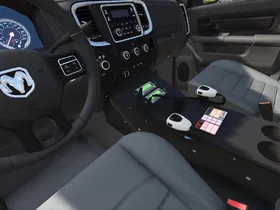
- Motorola radio by Kane104; Console, Code 3 Z3 siren controller, C3100 siren speaker, ELS setup and configuration files by Cj24.
Installation Instructions
Recommended – Automatic installation with LML (Lenny’s Mod Loader):
Copy the complete folder and its contents into your GTAV\lml folder. Open the Mod Manager, select the modification and click the “Copy files to game” button to install the ELS Vehicle Config File.

Manual Installation:
If possible, use OpenIV’s mods folder instead of replacing original files!

Use OpenIV to add all files in the Vehicle Files folder to GTAV\update\x64\dlcpacks\patchday13ng\dlc.rpf\x64\levels\gta5\vehicles.rpf.

Open Config Files\carvariations_meta.txt with any text editor and copy the complete content. Export GTAV\update\x64\dlcpacks\mpchristmas2\dlc.rpf\common\data\carvariations.meta using OpenIV, open it with any text editor, create a new line between </item> and </variationData> at the bottom of the file and paste the previously copied content into the new line. Replace the original carvariations.meta with the edited one.

Open Config Files\vehicles_meta.txt with any text editor and copy the complete content. Export GTAV\update\update.rpf\common\data\levels\gta5\vehicles.meta using OpenIV, open it with any text editor, create a new line between </item> and </InitDatas> and paste the previously copied content. Open Config Files\vehicles_meta_txdRelationships.txt with any text editor and copy the complete content. In your vehicles.meta, create a new line between </item> and </txdRelationships> and paste the previously copied content. Replace the original vehicles.meta with the edited one.

Copy the Config Files\fireutility.xml file and paste it into GTAV\ELS\pack_default. If you use a custom pack, add it to its folder.

You can spawn the car with the name “fireutility” by using a trainer.

To install the car in a different slot, change the names of the .yft, .ytd and .xml files, the <modelName> value of the carvariations.meta settings and the <modelName> and <txdName> values of the vehicles.meta settings respectively.

Optionally, if you don’t use any light enhancing mods, replace GTAV\update\update.rpf\common\data\visualsettings.dat with Config Files\visualsettings.dat using OpenIV.
  • Version 1.2

    • Cj24
    • January 16, 2020 at 7:30 PM
    • 16.29 MB
    • 3042 Downloads
    • Added option to install with LML.
    • Improved lightbar glass for more realistic color and opacity.
Smanbg
June 21, 2020 at 2:08 PM
  • Report Content

Is the base available anywhere? :)

RED-ITA
April 17, 2020 at 3:53 AM
  • Report Content

really really nice, i noticed just a little issue with the traffic amber advisor: lights are in the back of the lightbar, but their shades goes in the front, fix that and it'll be absolute amazing!

Cj24
April 17, 2020 at 5:19 PM
Author
  • Report Content

It's a bug with ELS. As a workaround, you can modify the VCF and change OffsetY for extras 7, 8 and 9 to -0.01, this will fix the direction, but also move the light source for the environment lights.

RED-ITA
April 17, 2020 at 7:04 PM
  • Report Content

thanks again sir🙏

adamenforcers
September 27, 2019 at 9:50 PM
  • Report Content

do you think you could make a cabana version? :D

Cj24
September 28, 2019 at 6:42 AM
Author
  • Report Content

A what?

adamenforcers
October 1, 2019 at 1:59 AM
  • Report Content

https://i.pinimg.com/originals/b3/6…37757a5f805.jpg you know more like this? :D

Cj24
October 1, 2019 at 7:12 AM
Author
  • Report Content

Not planned currently, possibly some time in the future.

File Details

Credits
- Original Dodge Ram model from Forza Horizon, converted and extensively modified by Kane104.
- Headlights, taillights, grille, fenders, bumper and interior modifications, seats and textures made by Kane104.
- Rims and tyre textures made by Kane104.
- Taillight textures, center brakelight, dirtmaps and minor modifications by Cj24.
- Code 3 RX2700 lightbar and LED X grill lights modeled and textured by Cj24.
- Motorola radio by Kane104; Console, Code 3 Z3 siren controller, C3100 siren speaker, ELS setup and configuration files by Cj24.
Installation Instructions
Recommended – Automatic installation with LML (Lenny’s Mod Loader):
Copy the complete folder and its contents into your GTAV\lml folder. Open the Mod Manager, select the modification and click the “Copy files to game” button to install the ELS Vehicle Config File.

Manual Installation:
If possible, use OpenIV’s mods folder instead of replacing original files!

Use OpenIV to add all files in the Vehicle Files folder to GTAV\update\x64\dlcpacks\patchday13ng\dlc.rpf\x64\levels\gta5\vehicles.rpf.

Open Config Files\carvariations_meta.txt with any text editor and copy the complete content. Export GTAV\update\x64\dlcpacks\mpchristmas2\dlc.rpf\common\data\carvariations.meta using OpenIV, open it with any text editor, create a new line between </item> and </variationData> at the bottom of the file and paste the previously copied content into the new line. Replace the original carvariations.meta with the edited one.

Open Config Files\vehicles_meta.txt with any text editor and copy the complete content. Export GTAV\update\update.rpf\common\data\levels\gta5\vehicles.meta using OpenIV, open it with any text editor, create a new line between </item> and </InitDatas> and paste the previously copied content. Open Config Files\vehicles_meta_txdRelationships.txt with any text editor and copy the complete content. In your vehicles.meta, create a new line between </item> and </txdRelationships> and paste the previously copied content. Replace the original vehicles.meta with the edited one.

Copy the Config Files\fireutility.xml file and paste it into GTAV\ELS\pack_default. If you use a custom pack, add it to its folder.

You can spawn the car with the name “fireutility” by using a trainer.

To install the car in a different slot, change the names of the .yft, .ytd and .xml files, the <modelName> value of the carvariations.meta settings and the <modelName> and <txdName> values of the vehicles.meta settings respectively.

Optionally, if you don’t use any light enhancing mods, replace GTAV\update\update.rpf\common\data\visualsettings.dat with Config Files\visualsettings.dat using OpenIV.

Author

  • Cj24

    Administrator
    Accurate Studio

More Files by Cj24

  • Dev Code 3 Warrior

    March 28, 2026 at 5:30 PM
    34 Downloads
  • Dev Code 3 Optix

    March 28, 2026 at 5:27 PM
    28 Downloads
  • Dev Code 3 LED X

    June 2, 2020 at 1:56 PM
    1.7k Downloads
  • GTA V 2008 Ford Crown Victoria Police Interceptor SAP - Blaine County Sheriff's Office (BCSO) - Unmarked Detective

    December 24, 2023 at 7:55 AM
    2.8k Downloads
  • GTA V 2010 Ford Crown Victoria Police Interceptor - Blaine County Sheriff's Office (BCSO) - Slicktop and Unmarked

    December 24, 2023 at 7:40 AM
    1.4k Downloads
All Files

Featured Modifications

  1. GTA V Siren fixes

    KLE0
    April 3, 2025 at 2:04 AM
  2. GTA V Dynamic Lighting System

    TheMaybeast
    August 19, 2020 at 6:42 PM
  3. GTA V Florida Highway Patrol FPIU - Unit 0354

    Jophics
    December 21, 2022 at 7:43 PM
  4. GTA V 2008 Ford Crown Victoria Police Interceptor SAP - Blaine County Sheriff's Office (BCSO) - Unmarked Detective

    Cj24
    December 24, 2023 at 7:55 AM
  5. GTA V 2014 Volkswagen Mk7 Golf GTI – South African Police Service - Flying Squad

    Kane104
    April 28, 2019 at 9:19 PM

Most Downloaded

  1. Dev 2018 Dodge Charger Pursuit DEV AWD PACKAGE ADDED!!!

    Peralta
    20k Downloads
  2. GTA V 2014 Volkswagen Mk7 Golf GTI – South African Police Service - Flying Squad

    Kane104
    14k Downloads
  3. GTA V 2013 Chevrolet Caprice PPV - Los Santos Sheriff’s Department

    Kane104
    8.3k Downloads
  4. GTA V Better License Plates

    Cj24
    7.3k Downloads
  5. Dev Code 3 RX2700 Lightbar

    Cj24
    6.7k Downloads
  1. Terms Of Use
  2. Privacy Policy
  3. Legal Notice
  4. Contact
Powered by WoltLab Suite™