1. Home
  2. Forums
  3. Downloads
    1. Featured Files
  4. Gallery
    1. Albums
  5. Guides
    1. SirenSetting Calculator
  6. Discord
  7. Accurate Studio
  • Login
  • Register
  • Search
EMS / Fire Dept.
  • Everywhere
  • EMS / Fire Dept.
  • Forum
  • Gallery
  • Files
  • Guides
  • More Options
  1. Modding Forum
  2. Downloads
  3. All Files
  4. Grand Theft Auto V
  5. Vehicle Textures
  6. EMS / Fire Dept.

Blaine County Fire Dept. Lore-Friendly Small Livery Pack

  • Crizby
  • May 29, 2018 at 11:00 AM
  • 1.7k Downloads
  • 2 Comments
  • Download
  • Overview
  • Versions 2
  • Comments 2

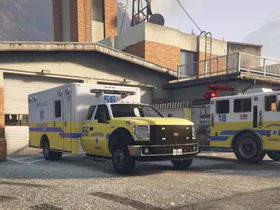
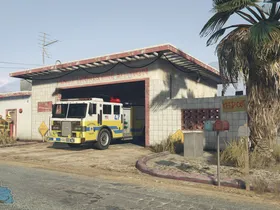
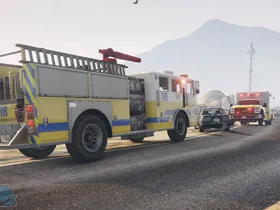
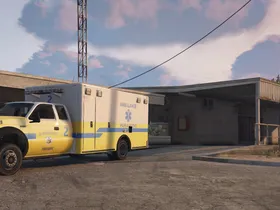
A small lore-friendly fire dept. Pack to protect life and property in Blaine County!

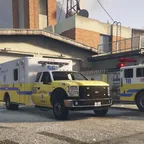
A small lore-friendly fire dept. Pack based off the Ventura County Fire Dept. 4x liveries for the ambulance is included, as well as 4x liveries for the fire engine. The liveries are available in both 2048x2048 (Regular) and 4096x4096 (High Quality).

Vehicle Links;

- ELS Vapid Ambulance

http://www.lcpdfr.com/files/file/14576-els-vapid-ambulance/

- Vapid Ambulance non-ELS (Can be found in this pack)

http://www.lcpdfr.com/files/file/121…s-vehicle-pack/

- MTL Firetruk

- http://www.lcpdfr.com/files/file/9007-uv-mapped-firetruck/

- ELS Pierce LAFD Firetruck (Same template as the GTA MTL Firetruck)

http://www.lcpdfr.com/files/file/104…uck-by-pimdslr/


By downloading this file, you have agreed that;

- You may edit these liveries as much as you want for private use only

- That you will ask for permission from Crizby prior to uploading them

- That if they are used in a clan pack, proper credits to the original creator will be displayed

Orginially uploaded to AccurateStudio.com (Also known as Modding-Forum.com)

Images

  • Paleto Bay.webp
    • 53.9 kB
    • 847 × 401
  • Sandy Shores.webp
    • 78.13 kB
    • 883 × 489
  • rsz_incident.webp
    • 85.04 kB
    • 1,306 × 667
  • Sandy Shores 2.webp
    • 76.09 kB
    • 1,302 × 642
Credits
Designs;
- Made from scratch by Crizby with Photoshop & Paint.NET
- Inspiration from the Ventura County Fire Dept. Such as colors, general design and dept. Logo
Installation Instructions
Installation Instructions step-by-step how to navigate (using OpenIV):
1. GTA V Main Directory
2. Mods
3. Update
4. x64
5. dlcpacks
6. patchday18ng (Navigate to YOUR latest patchday, mine was 'patchday18' at the time of writing these instructions)
7. dlc.rpf
8. x64
9. levels
10. gta 5
11. vehicles.rpf
12. Click on 'Edit Mode' in the top of OpenIV
13. Double-click on the slot which is either your 'ambulance.ytd' or 'firetruk.ytd'
14. Find the texture you wish to replace, E.G. ambulance_sign_2 and click 'Replace'
15. Press 'Save' and once it has finished loading and closed the page, you can close OpenIV and enjoy the liveries!

*Please note that on the non-els firetruk, you have to replace textures both in 'firetruk.ytd' AND 'firetruk+hi.ytd
  • Version 1.2.0

    • Crizby
    • June 1, 2018 at 10:16 AM
    • 8.9 MB
    • 1089 Downloads

    Update 1.2

    - Now features 4x 4096x4096 (High Quality) Liveries for both the ambulance and fire engine as per request

    - Corrected a typo in the instructions


    Let me know if you have any feedback, questions, concerns!

  • Version 1.0.0

    • Crizby
    • May 29, 2018 at 11:00 AM
    • 1.68 MB
    • 654 Downloads
Cj24
May 29, 2018 at 5:46 PM
  • Report Content

Really nice skins! Would it be possible to provide 4k versions as well?

Crizby
May 30, 2018 at 11:38 AM
Author
  • Report Content

I will look into it during the weekend! Glad you like them :)

File Details

Credits
Designs;
- Made from scratch by Crizby with Photoshop & Paint.NET
- Inspiration from the Ventura County Fire Dept. Such as colors, general design and dept. Logo
Installation Instructions
Installation Instructions step-by-step how to navigate (using OpenIV):
1. GTA V Main Directory
2. Mods
3. Update
4. x64
5. dlcpacks
6. patchday18ng (Navigate to YOUR latest patchday, mine was 'patchday18' at the time of writing these instructions)
7. dlc.rpf
8. x64
9. levels
10. gta 5
11. vehicles.rpf
12. Click on 'Edit Mode' in the top of OpenIV
13. Double-click on the slot which is either your 'ambulance.ytd' or 'firetruk.ytd'
14. Find the texture you wish to replace, E.G. ambulance_sign_2 and click 'Replace'
15. Press 'Save' and once it has finished loading and closed the page, you can close OpenIV and enjoy the liveries!

*Please note that on the non-els firetruk, you have to replace textures both in 'firetruk.ytd' AND 'firetruk+hi.ytd

Author

  • Crizby

    Developer

More Files by Crizby

  • GTA V Gruppe6 Patrol Mini-Pack

    December 8, 2021 at 6:37 AM
    1.5k Downloads
  • GTA V Los Santos Port Police Livery Pack

    June 2, 2020 at 11:45 AM
    1.2k Downloads
  • GTA V Los Santos Area Taxi Liveries

    April 9, 2020 at 12:39 PM
    2.7k Downloads
  • GTA V Del Perro Police Livery Pack

    May 26, 2020 at 6:23 PM
    1.1k Downloads
  • GTA V Rockford Hills Police Livery Pack

    May 26, 2020 at 5:35 PM
    1.5k Downloads
All Files

Featured Modifications

  1. GTA V 1986 Chevrolet Caprice 9C1 LAPD CRASH unit [Add-On | LODs | VehFuncsV]

    aerodynic
    September 28, 2025 at 7:11 AM
  2. GTA V 2014 Volkswagen Mk7 Golf GTI – South African Police Service - Flying Squad

    Kane104
    April 28, 2019 at 9:19 PM
  3. GTA V Better License Plates

    Cj24
    September 30, 2017 at 2:48 PM
  4. GTA V SFPD 2016 and 2020 FPIU Collection

    KLE0
    September 14, 2024 at 6:03 AM
  5. GTA V 2008 Ford Crown Victoria Police Interceptor SAP - Blaine County Sheriff's Office (BCSO) - Unmarked Detective

    Cj24
    December 24, 2023 at 7:55 AM

Most Downloaded

  1. Dev 2018 Dodge Charger Pursuit DEV AWD PACKAGE ADDED!!!

    Peralta
    20k Downloads
  2. GTA V 2014 Volkswagen Mk7 Golf GTI – South African Police Service - Flying Squad

    Kane104
    14k Downloads
  3. GTA V 2013 Chevrolet Caprice PPV - Los Santos Sheriff’s Department

    Kane104
    8.4k Downloads
  4. GTA V Better License Plates

    Cj24
    7.4k Downloads
  5. Dev Code 3 RX2700 Lightbar

    Cj24
    6.8k Downloads
  1. Terms Of Use
  2. Privacy Policy
  3. Legal Notice
  4. Contact
Powered by WoltLab Suite™