1. Home
  2. Forums
  3. Downloads
    1. Featured Files
  4. Gallery
    1. Albums
  5. Guides
    1. SirenSetting Calculator
  6. Discord
  7. Accurate Studio
  • Login
  • Register
  • Search
Police Vehicles
  • Everywhere
  • Police Vehicles
  • Forum
  • Gallery
  • Files
  • Guides
  • More Options
  1. Modding Forum
  2. Downloads
  3. All Files
  4. Grand Theft Auto V
  5. Vehicles
  6. Police Vehicles

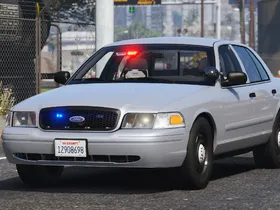
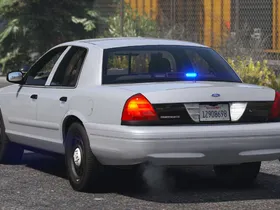
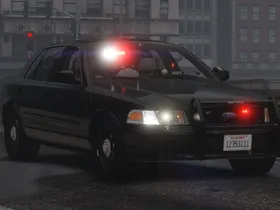
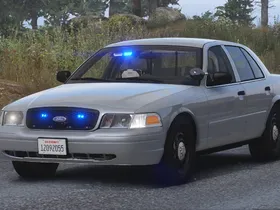
a 2008 Ford Crown Victoria Police Interceptor - Unmarked with Whelen Talon

    • United States
    • Ford
    • DLS / non-ELS
    • Accurate Studio
  • Cj24
  • June 15, 2022 at 5:42 PM
  • 2.5k Downloads
  • 2 Comments
  • Download
  • Overview
  • Versions 1
  • Comments 2

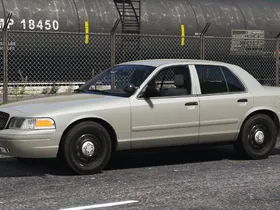
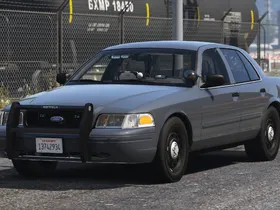
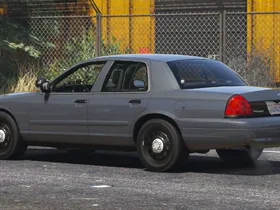
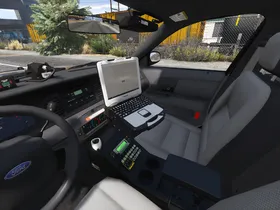
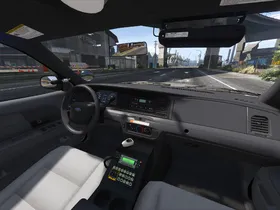
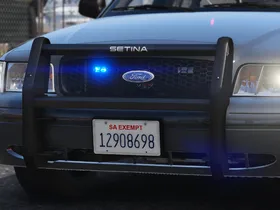
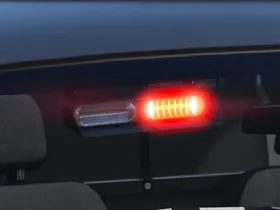
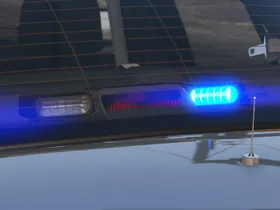
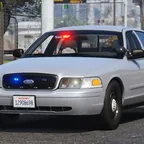
An unmarked non-ELS / DLS 2008 Ford Crown Victoria Police Interceptor with Whelen Talon and LIN3 lights. Includes equipment extra components, allowing setups ranging from detective cars with minimal equipment to fully equipped unmarked patrol setups.

External Content www.youtube.com
Content embedded from external sources will not be displayed without your consent.

Vehicle Slot: police4 (Replace) or cvpi_unm_talon (Add-On)
Lighting Equipment: Whelen Talon
DLS Support: DLS 1.4 (optional)
Multiple Liveries: Supported, but not included

Notes

This mod supports DLS (Dynamic Lighting System) for light stages, siren controls and more. DLS is optional, only light stage 3 will be usable without DLS.

It is recommended to use a modified visualsettings.dat file to increase emergency light brightness, such as my Improved Emergency Lights modification.

All blue, all red, blue with rear amber and red/white with rear red/blue options are included. A California inspired version with an additional passenger side spotlight, modified light colors, patterns and stages is available separately:

File

2008 Ford Crown Victoria Police Interceptor - Unmarked with Whelen Talon (California)
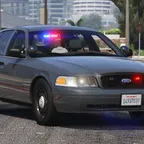
A California inspired version of my unmarked non-ELS / DLS 2008 Ford Crown Victoria Police Interceptor with Whelen Talon and LIN3 lights.
Cj24
June 25, 2022 at 9:05 AM

Extra components (default setting in brackets):

  • extra 5: Pushbar (off)
  • extra 6: Headlight hideaway strobes (on)
  • extra 7: Laptop (on)
  • extra 8: Partition (on)
  • extra 10: Radar (off)

Recommended mods:

  • Better License Plates
  • SirenSetting Limit Adjuster (minimizes the risk of sirensetting ID conflicts with other mods)

Unlocked parts for vehicle developers:

  • Whelen LIN3 LEDs
  • Setina PB400 Pushbar for CVPI
  • Unity PAR46 Halogen Spotlight
  • Havis Console for CVPI
  • Setina Partition for CVPI
  • Panasonic Toughbook CF-30
  • Whelen Cencom Controller
  • Whelen SA315P Siren Speaker
  • Motorola Antennas
  • SoundOff Signal Interior Dome Light

Images

  • pic (1).webp
    • 275.49 kB
    • 2,560 × 1,440
  • pic (2).webp
    • 236.67 kB
    • 2,560 × 1,440
  • 20220815151152_1.webp
    • 119.41 kB
    • 2,560 × 1,440
  • 20220815152042_1.webp
    • 372.53 kB
    • 2,560 × 1,440
  • pic (3).webp
    • 432.97 kB
    • 2,560 × 1,440
  • pic (4).webp
    • 313.1 kB
    • 2,560 × 1,440
  • pic (5).webp
    • 374.11 kB
    • 2,560 × 1,440
  • pic (6).webp
    • 292.25 kB
    • 2,560 × 1,440
  • pic (7).webp
    • 207.82 kB
    • 2,560 × 1,440
  • pic (8).webp
    • 109.43 kB
    • 2,560 × 1,440
  • pic (9).webp
    • 66.11 kB
    • 2,560 × 1,440
  • pic (10).webp
    • 78.02 kB
    • 2,560 × 1,440
Credits
- Original vehicle model is Ford Crown Victoria Police Interceptor from Forza, converted to GTA V and edited to 2003-2011 CVPI by HANAKO. Information, references, and support provided by Cartres, 0taku, Officer Underwood, EVI, Cj24, Oleg, Vans123 and the members of Modding Forum.
- Minor base edits by Cj24, including downscaling and compression improvements for some textures, modified taillight emissive color and window opacity, adjustments to license plate and third brake light scale and transmission tunnel height. Light emissive textures upscaled and colors adjusted by Cartres.
- Undercarriage, tires, and rims made from scratch by HANAKO, Tire textures by RobertTM and Cartres.
- Whelen Talon modeled and textured by Kane104, emissive textures by Cj24.
- Whelen LIN3 and hideaway strobe lights modeled and textured by Cj24.
- Motorola radio and Stalker radar modeled and textured by Kane104.
- Setina PB400 pushbar, Whelen Cencom controller, SA315P siren speaker, Havis console, Setina partition, Panasonic Toughbook, SoundOff Signal dome light, Unity spotlights, and antenna modeled and textured by Cj24.
- Lighting and DLS setup, and configuration files by Cj24.
Installation Instructions
Recommended - Add-On or Replace: Automatic installation with LML (Lenny's Mod Loader)
Copy the Replace or the Add-On folder with its contents into your GTAV\lml folder. Open the Mod Manager, select the modification and click the "Copy files to game" button to install the DLS Vehicle Config File.


Manual Installation: Add-On Version
Open the Add-On folder and copy the contents of the Files\GTAV folder to your GTA V folder.

Export GTAV\update\update.rpf\common\data\dlclist.xml using OpenIV, open it with any text editor, and add the following line between </Item> and </Paths> at the bottom of the file:
<Item>dlcpacks:/accvpi_unm_talon/</Item>
Replace the original dlclist.xml with the edited one.

To install the DLS Vehicle Config File, copy the contents of the Data Files\DLS\GTAV folder to your GTA V folder.


Manual Installation: Replace Version
Open the Replace folder and copy the contents of the Files\GTAV folder to your GTA V folder.

Export GTAV\update\update.rpf\common\data\dlclist.xml using OpenIV, open it with any text editor, and add the following line between </Item> and </Paths> at the bottom of the file:
<Item>dlcpacks:/acpolice4/</Item>
Replace the original dlclist.xml with the edited one.

Open Data Files\vehicles_meta.txt with any text editor and copy all its content. Export GTAV\update\update.rpf\common\data\levels\gta5\vehicles.meta using OpenIV, open it with any text editor, create a new line between </item> and </InitDatas> and paste the previously copied content. Open Data Files\vehicles_meta_txdRelationships.txt with any text editor and copy all its content. In your exported vehicles.meta, create a new line between </item> and </txdRelationships> and paste the previously copied content. Replace the original vehicles.meta with the edited one.

To install the DLS Vehicle Config File, copy the contents of the Data Files\DLS\GTAV folder to your GTA V folder.
Permissions

Redistributing this file or its contents is not permitted.

Modifying this file or using any of its assets to create other modifications is permitted only under certain conditions.

Using this modification in multiplayer servers such as FiveM is permitted only under certain conditions.

You may replace or edit textures and create and redistribute liveries of your own using the provided template. When using this modification in a public multiplayer server, a link to this file must be provided for your users.

You may not circumvent any protecting measures to edit models. You may not redistribute this archive or its contents. You may not use any included textures for other modifications.
  • Version 1.2

    • Cj24
    • June 25, 2022 at 9:05 AM
    • 30.33 MB
    • 2284 Downloads
    • Added template mapping for trunk fascia.
    • Fixed missing taillight environment reflections.
Cram
September 26, 2022 at 1:52 AM
  • Report Content

is this by chance FiveM readdy or could you make a FiveM ready version?

Cj24
September 27, 2022 at 7:53 AM
Author
  • Report Content

It can be used with FiveM, but as I don't use FiveM myself it is not set up for it by default.

File Details

Credits
- Original vehicle model is Ford Crown Victoria Police Interceptor from Forza, converted to GTA V and edited to 2003-2011 CVPI by HANAKO. Information, references, and support provided by Cartres, 0taku, Officer Underwood, EVI, Cj24, Oleg, Vans123 and the members of Modding Forum.
- Minor base edits by Cj24, including downscaling and compression improvements for some textures, modified taillight emissive color and window opacity, adjustments to license plate and third brake light scale and transmission tunnel height. Light emissive textures upscaled and colors adjusted by Cartres.
- Undercarriage, tires, and rims made from scratch by HANAKO, Tire textures by RobertTM and Cartres.
- Whelen Talon modeled and textured by Kane104, emissive textures by Cj24.
- Whelen LIN3 and hideaway strobe lights modeled and textured by Cj24.
- Motorola radio and Stalker radar modeled and textured by Kane104.
- Setina PB400 pushbar, Whelen Cencom controller, SA315P siren speaker, Havis console, Setina partition, Panasonic Toughbook, SoundOff Signal dome light, Unity spotlights, and antenna modeled and textured by Cj24.
- Lighting and DLS setup, and configuration files by Cj24.
Installation Instructions
Recommended - Add-On or Replace: Automatic installation with LML (Lenny's Mod Loader)
Copy the Replace or the Add-On folder with its contents into your GTAV\lml folder. Open the Mod Manager, select the modification and click the "Copy files to game" button to install the DLS Vehicle Config File.


Manual Installation: Add-On Version
Open the Add-On folder and copy the contents of the Files\GTAV folder to your GTA V folder.

Export GTAV\update\update.rpf\common\data\dlclist.xml using OpenIV, open it with any text editor, and add the following line between </Item> and </Paths> at the bottom of the file:
<Item>dlcpacks:/accvpi_unm_talon/</Item>
Replace the original dlclist.xml with the edited one.

To install the DLS Vehicle Config File, copy the contents of the Data Files\DLS\GTAV folder to your GTA V folder.


Manual Installation: Replace Version
Open the Replace folder and copy the contents of the Files\GTAV folder to your GTA V folder.

Export GTAV\update\update.rpf\common\data\dlclist.xml using OpenIV, open it with any text editor, and add the following line between </Item> and </Paths> at the bottom of the file:
<Item>dlcpacks:/acpolice4/</Item>
Replace the original dlclist.xml with the edited one.

Open Data Files\vehicles_meta.txt with any text editor and copy all its content. Export GTAV\update\update.rpf\common\data\levels\gta5\vehicles.meta using OpenIV, open it with any text editor, create a new line between </item> and </InitDatas> and paste the previously copied content. Open Data Files\vehicles_meta_txdRelationships.txt with any text editor and copy all its content. In your exported vehicles.meta, create a new line between </item> and </txdRelationships> and paste the previously copied content. Replace the original vehicles.meta with the edited one.

To install the DLS Vehicle Config File, copy the contents of the Data Files\DLS\GTAV folder to your GTA V folder.

Author

  • Cj24

    Administrator
    Accurate Studio

More Files by Cj24

  • Dev Code 3 Warrior

    March 28, 2026 at 5:30 PM
    67 Downloads
  • Dev Code 3 Optix

    March 28, 2026 at 5:27 PM
    51 Downloads
  • Dev Code 3 LED X

    June 2, 2020 at 1:56 PM
    1.8k Downloads
  • GTA V 2008 Ford Crown Victoria Police Interceptor SAP - Blaine County Sheriff's Office (BCSO) - Unmarked Detective

    December 24, 2023 at 7:55 AM
    2.9k Downloads
  • GTA V 2010 Ford Crown Victoria Police Interceptor - Blaine County Sheriff's Office (BCSO) - Slicktop and Unmarked

    December 24, 2023 at 7:40 AM
    1.4k Downloads
All Files

Featured Modifications

  1. GTA V 2014 Volkswagen Mk7 Golf GTI – South African Police Service - Flying Squad

    Kane104
    April 28, 2019 at 9:19 PM
  2. GTA V Better License Plates

    Cj24
    September 30, 2017 at 2:48 PM
  3. GTA IV Unmarked Police Cruiser

    aerodynic
    February 19, 2026 at 1:19 AM
  4. GTA V 2014 Volkswagen Mk7 Golf GTI

    Kane104
    April 30, 2019 at 7:50 PM
  5. GTA V SFPD 2016 and 2020 FPIU Collection

    KLE0
    September 14, 2024 at 6:03 AM

Most Downloaded

  1. Dev 2018 Dodge Charger Pursuit DEV AWD PACKAGE ADDED!!!

    Peralta
    20k Downloads
  2. GTA V 2014 Volkswagen Mk7 Golf GTI – South African Police Service - Flying Squad

    Kane104
    14k Downloads
  3. GTA V 2013 Chevrolet Caprice PPV - Los Santos Sheriff’s Department

    Kane104
    8.3k Downloads
  4. GTA V Better License Plates

    Cj24
    7.4k Downloads
  5. Dev Code 3 RX2700 Lightbar

    Cj24
    6.8k Downloads
  1. Terms Of Use
  2. Privacy Policy
  3. Legal Notice
  4. Contact
Powered by WoltLab Suite™