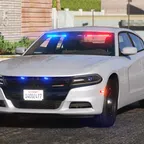
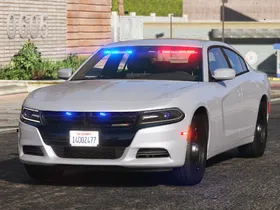
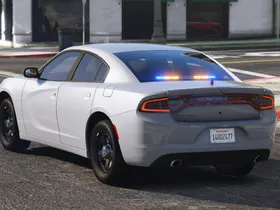
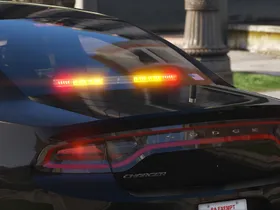
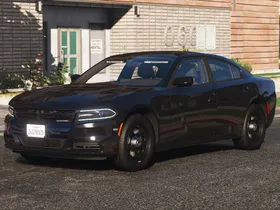
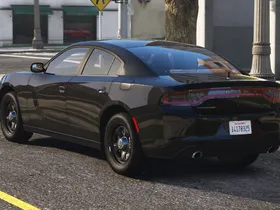
Vehicle Slot: police4 (Replace) or lspdunm (Add-On)
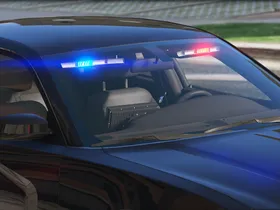
Lighting Equipment: Federal Signal Spectralux ILS and CN SignalMaster
DLS Support: DLS 1.4 (optional)
Multiple Liveries: Supported, but not included
Notes
This mod supports DLS (Dynamic Lighting System) for realistic light stages, siren controls and more. DLS is optional, this car functions as a non-ELS car without DLS.
When using DLS, make sure to install AdvancedHookV and activate the PatchExtras option in your DLS.ini. Otherwise, the car will always be repaired when switching to light stage 1.
Recommended mods:
- Better License Plates or Better License Plates - California
- Federal Signal SS2000 SmartSiren
- SirenSetting Limit Adjuster (minimizes the risk of sirensetting ID conflicts with other mods)
Unlocked parts for vehicle developers:
- 2018 Dodge Charger Pursuit with Goodyear Eagle RS-A Tire
- Federal Signal Spectralux Interior Lightbar
- Federal Signal CN SignalMaster Traffic Advisor
- Federal Signal MicroPulse Light
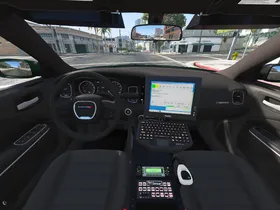
- Havis Console for 2018 Dodge Charger
- Federal Signal Smart Controller
- Federal Signal ES100 Speaker
- Motorola HAE6016A Antenna
- SoundOff Signal Interior Dome Light
Images
Credits
- Original vehicle model is 2015 Dodge Charger from Forza, edited into the 2018 Dodge Charger Pursuit by Peralta with parts from FH3 and Gamemodels.
- Seats, center mirror, shifter and dashboard edits by Kane104.
- Rear bumper diffuser modeled by Patrol 31, Normals edited by Steinberg.
- Charger badge modeled by iansonwheels, converted to V by Peralta.
- Interior dial textures made by NeonLazer; interior button textures made by Slendis.
- Rims from Gamemodels, center cap modified by Peralta; Tire texture made by Robert, modified by Kane104 and Cj24.
- Federal Signal Spectralux ILS, CN SignalMaster and MicroPulse lights modeled and textured by Cj24.
- Motorola radio by Kane104; LSPD MDCS texture, Console, Screen, Keyboard, FS Smart System siren controller, ES100 siren speaker, interior dome light, antenna, lights and DLS setup, DLS Smart Controller UI and configuration files by Cj24.
- Seats, center mirror, shifter and dashboard edits by Kane104.
- Rear bumper diffuser modeled by Patrol 31, Normals edited by Steinberg.
- Charger badge modeled by iansonwheels, converted to V by Peralta.
- Interior dial textures made by NeonLazer; interior button textures made by Slendis.
- Rims from Gamemodels, center cap modified by Peralta; Tire texture made by Robert, modified by Kane104 and Cj24.
- Federal Signal Spectralux ILS, CN SignalMaster and MicroPulse lights modeled and textured by Cj24.
- Motorola radio by Kane104; LSPD MDCS texture, Console, Screen, Keyboard, FS Smart System siren controller, ES100 siren speaker, interior dome light, antenna, lights and DLS setup, DLS Smart Controller UI and configuration files by Cj24.
Installation Instructions
Recommended – Add-On or Replace: Automatic installation with LML (Lenny's Mod Loader)
Copy the Replace or the Add-On folder with its contents into your GTAV\lml folder. Open the Mod Manager, select the modification and click the "Copy files to game" button to install the DLS Vehicle Config File and the custom DLS UI.
Optionally, if you do not use any mod that enhances the light brightness, open the Mod Manager, double click on the modification's name and enable the "Visual Settings (Brighter Lights)" group.
Manual Installation: Add-On Version
Open the Add-On folder and copy the contents of the Files\GTAV folder to your GTA V folder.
Export GTAV\update\update.rpf\common\data\dlclist.xml using OpenIV, open it with any text editor, and add the following line between </Item> and </Paths> at the bottom of the file:
<Item>dlcpacks:/aclspdunm/</Item>
Replace the original dlclist.xml with the edited one.
To install the DLS Vehicle Config File and the custom DLS UI, copy the contents of the Data Files\DLS\GTAV folder to your GTA V folder.
Optionally, if you do not use any mod that enhances the light brightness, replace GTAV\update\update.rpf\common\data\visualsettings.dat with Data Files\visualsettings.dat.
Manual Installation: Replace Version
Open the Replace folder and copy the contents of the Files\GTAV folder to your GTA V folder.
Export GTAV\update\update.rpf\common\data\dlclist.xml using OpenIV, open it with any text editor, and add the following line between </Item> and </Paths> at the bottom of the file:
<Item>dlcpacks:/acpolice4/</Item>
Replace the original dlclist.xml with the edited one.
Open Data Files\vehicles_meta.txt with any text editor and copy all its content. Export GTAV\update\update.rpf\common\data\levels\gta5\vehicles.meta using OpenIV, open it with any text editor, create a new line between </item> and </InitDatas> and paste the previously copied content. Open Data Files\vehicles_meta_txdRelationships.txt with any text editor and copy all its content. In your exported vehicles.meta, create a new line between </item> and </txdRelationships> and paste the previously copied content. Replace the original vehicles.meta with the edited one.
To install the DLS Vehicle Config File and the custom DLS UI, copy the contents of the Data Files\DLS\GTAV folder to your GTA V folder.
Optionally, if you do not use any mod that enhances the light brightness, replace GTAV\update\update.rpf\common\data\visualsettings.dat with Data Files\visualsettings.dat.
Copy the Replace or the Add-On folder with its contents into your GTAV\lml folder. Open the Mod Manager, select the modification and click the "Copy files to game" button to install the DLS Vehicle Config File and the custom DLS UI.
Optionally, if you do not use any mod that enhances the light brightness, open the Mod Manager, double click on the modification's name and enable the "Visual Settings (Brighter Lights)" group.
Manual Installation: Add-On Version
Open the Add-On folder and copy the contents of the Files\GTAV folder to your GTA V folder.
Export GTAV\update\update.rpf\common\data\dlclist.xml using OpenIV, open it with any text editor, and add the following line between </Item> and </Paths> at the bottom of the file:
<Item>dlcpacks:/aclspdunm/</Item>
Replace the original dlclist.xml with the edited one.
To install the DLS Vehicle Config File and the custom DLS UI, copy the contents of the Data Files\DLS\GTAV folder to your GTA V folder.
Optionally, if you do not use any mod that enhances the light brightness, replace GTAV\update\update.rpf\common\data\visualsettings.dat with Data Files\visualsettings.dat.
Manual Installation: Replace Version
Open the Replace folder and copy the contents of the Files\GTAV folder to your GTA V folder.
Export GTAV\update\update.rpf\common\data\dlclist.xml using OpenIV, open it with any text editor, and add the following line between </Item> and </Paths> at the bottom of the file:
<Item>dlcpacks:/acpolice4/</Item>
Replace the original dlclist.xml with the edited one.
Open Data Files\vehicles_meta.txt with any text editor and copy all its content. Export GTAV\update\update.rpf\common\data\levels\gta5\vehicles.meta using OpenIV, open it with any text editor, create a new line between </item> and </InitDatas> and paste the previously copied content. Open Data Files\vehicles_meta_txdRelationships.txt with any text editor and copy all its content. In your exported vehicles.meta, create a new line between </item> and </txdRelationships> and paste the previously copied content. Replace the original vehicles.meta with the edited one.
To install the DLS Vehicle Config File and the custom DLS UI, copy the contents of the Data Files\DLS\GTAV folder to your GTA V folder.
Optionally, if you do not use any mod that enhances the light brightness, replace GTAV\update\update.rpf\common\data\visualsettings.dat with Data Files\visualsettings.dat.
-
Version 2.3S-DLS
-
Cj24 -
February 13, 2021 at 7:03 PM -
22.88 MB -
4611 Downloads
- Easier installation process for Replace version, using a DLC wherever possible.
- Added default tuning options.
- Fixed incorrectly positioned light LOD.
-