1. Home
  2. Forums
  3. Filebase
    1. Featured Files
  4. Gallery
    1. Albums
  5. Guides
    1. SirenSetting Calculator
  6. Discord
  7. Accurate Studio
  • Login
  • Register
  • Search
Texturing
  • Everywhere
  • Texturing
  • Forum
  • Gallery
  • Files
  • Guides
  • More Options
  1. Modding Forum
  2. Guides
  3. Grand Theft Auto V
  4. Creating Mods
  5. Texturing

Texture Compression

  • Kane104
  • March 5, 2017 at 7:06 AM
  • 30,357 Views
  • 0 Comments
This guide provides information to help choose the right texture compression.
Contents [hideshow]
  1. Comparison of texture compressions
    1. Which compression should I use?
  2. Avoiding greyscale discoloration with DXT compression
    1. Greyscale Compression Table
    2. Color Swatches for Photoshop

Comparison of texture compressions

The DirectX texture format .dds supports different compression types. They can be set on export, from example when using the Nvidia Texture Tools, or they can be changed in tools such as OpenIV for GTA IV and V. Block compression formats are used most commonly, they give the best compromise between size and quality. In some cases however, older block compression formats such as DXT (BC1, BC2 and BC3) lose color information, which is especially noticeable with grey colors. Newer formats such as BC7 combine a low file size with very high quality, but may not be supported by older games.

Which compression should I use?

This table compares the most commonly used formats. File size is for a 1024x1024 texture with mipmaps. For .dds files, the complexity of a texture does not affect its size, only the resolution does.

Type Quality AlphaFile Size Use Cases
BC1 (DXT1) Block compression, can cause compression artifacts or discoloration None683 KB Textures without an alpha (transparency) channel.
BC2 (DXT3) Block compression, can cause compression artifacts or discoloration 4 Bit Alpha1366 KB Textures with a simple alpha channel without any gradients or smooth transitions. Due to the identical file size, using BC3 is recommended instead.
BC3 (DXT5) Block compression, can cause compression artifacts or discoloration Interpolated 8 Bit Alpha1366 KB Textures with a complex alpha channel that can not be handled by BC1.
BC7 Modern block compression, supports gradients and greyscale colors, nearly identical to uncompressed textures. Quality and exporting speed can vary depending on the exporting tool used. Interpolated 8 Bit Alpha1366 KB Requires DirectX 11 or newer.
Same use cases as DXT5. If a DXT texture has compression artifacts or discoloration, BC7 can be used instead. (Examples: gradients, greyscale textures, or detailed normal maps)
Uncompressed (A8R8GB8, RGBA 8.8.8.8) Uncompressed, no quality reduction. Interpolated 8 Bit Alpha5462 KB Not recommended, use only if BC7 is not an option.
Complex or greyscale textures that do not work well with DXT compression. Very large file size, decreasing the texture resolution is recommended to decrease file size, an uncompressed 512x512px texture will have the same file size as a 1024x1024px BC3 or BC7 texture.

Avoiding greyscale discoloration with DXT compression

Often when converting to DDS, choosing any of the DXT formats will cause the discoloration due to the compression of the texture and leave you with a purple or green shade hanging over your texture. This table ranging from RGB 0, 0, 0 to RGB 255, 255, 255 can be used to see exactly what colors would be altered after export to DDS.

As an example, colors such as RGB 31, 31, 31 would result in being RGB 30, 31, 30. The green being a mere one above red and blue results in this green shade. Other examples are the inverse of that, such as RGB 40, 40, 40 which results in RGB 41, 40, 41 after compression. Because the green is lower in this case, the color takes on the purple shade.

Greyscale Compression Table

Compression algorithms differ for different tools. This comparison was created for the Nvidia Texture Tools Exporter.

The colors that resulted in grayscale RGB colors without any green or purple dominance in the DDS file are marked on the table with green ticks.
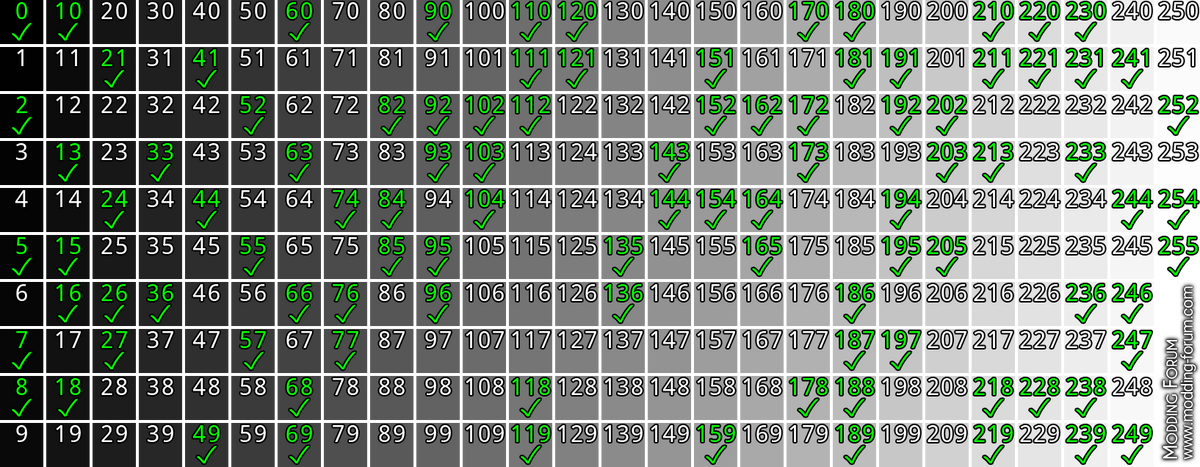

Sometimes, the compressed color is slightly different, an example of this is RGB 2, 2, 2 which results in RGB 3, 3, 3. Regardless of the rounding, its still equal and can be used but the key is to use the value before compression which was originally RGB 2, 2, 2, as marked in the table.

Color Swatches for Photoshop

Thread

Safe DXT greyscale color palette for Photoshop/Illustrator

This is an Adobe Swatch Exchange file which contains swatches for all greyscale colors which can be safely exported by the NVidia Texture Tools DDS exporter without discoloration/tinting due to DXT compression.

To install, simply open the Swatches panel in either Photoshop or Illustrator, click the menu button in the top right corner of the panel, and select "Load Swatches" or "Open Swatch Library > Other Library" and select the provided file. Use any color in the swatch group for greyscale…
Tools
PNWParksFan
January 13, 2023 at 9:12 AM

Authors

  • Cj24

    Administrator
    Accurate Studio
  • PNWParksFan

    Developer
  • Kane104

    Accurate Studio

Previous Guide Mipmaps

Next Guide Tools Needed to Create Textures

Participate now!

Don’t have an account yet? Register yourself now and be a part of our community!

Register Yourself Login

Authors

  • Cj24

    Administrator
    Accurate Studio
  • PNWParksFan

    Developer
  • Kane104

    Accurate Studio

Categories

  1. Grand Theft Auto V 21
  2. Installing Mods 4
  3. Creating Mods 17
  4. Texturing 4
  5. Modeling 2
  6. Vehicle Modifications 11
  7. Reset Filter
  1. Terms Of Use
  2. Privacy Policy
  3. Legal Notice
  4. Contact
Powered by WoltLab Suite™