

how do i display gta options in my zmodeler property???
thx

Change GTA V Options
-
- ZModeler 3
-
msiaf10 -
November 7, 2021 at 8:07 PM
-
-
Cj24
November 7, 2021 at 8:12 PM Added the label ZModeler 3 -
Cj24
November 7, 2021 at 8:12 PM Changed the title of the thread from “how make bulleteproff fivem” to “Change GTA V Options”. -
The options are only shown in polygon mode or when collisions are selected. Switch to polygon mode, select the model you want to change, select the polygons you want to apply the ID to, then the GTA V Options should appear.
-
The options are only shown in polygon mode or when collisions are selected. Switch to polygon mode, select the model you want to change, select the polygons you want to apply the ID to, then the GTA V Options should appear.
i still not understand, can u help me make a video about GTA V Options in zmodeler
I have followed but why is it still the same
-
Firstly, make sure your COL option is ticked on in the structure tab. This will display all of the collision objects
\/\/\/
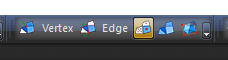
External Content i.gyazo.comContent embedded from external sources will not be displayed without your consent.Secondly, once you have done this. Now click on the polygon option which is located towards the top middle area of zmodler. The polygon option is the one in yellow in the picture.
External Content i.gyazo.comContent embedded from external sources will not be displayed without your consent.Third, once you have selected the polygon mode you will then click on the desired collision object and it will enter the poly edit mode. Once you have done this, click and drag to select said object, navigate to the properties tab and you should then see the GTAV options. Click the box to the left of "Options" this will check these options on. Then to select whichever options you would like double click in the blank area on the right and it will open up an options menu for you to select what you need
External Content i.gyazo.comContent embedded from external sources will not be displayed without your consent. -
Also, I do not believe the option for the GTAV box will appear if you have multiples selected at one time. I believe you must do each one individually
-
Also check that in the Configuration window > General > Compatibility, Settings is set to GTA V.
If it is already set to GTA V, set it to another value first (for example Default), then set it back to GTA V, and click on Apply.
-
-
someone figure it out?


Participate now!
Don’t have an account yet? Register yourself now and be a part of our community!